
So I have been using PyWrite for awhile now, my folder of text files based manuscript editor. It is simple and to the point, and modified can also be used as a code editor (Pysano). But while it is great for composing posts for WordPress it is not so great at organizing a manuscript. And you are left with a bunch of text files at the end of the day.
Soo, back to the drawing board for something a bit more advanced.
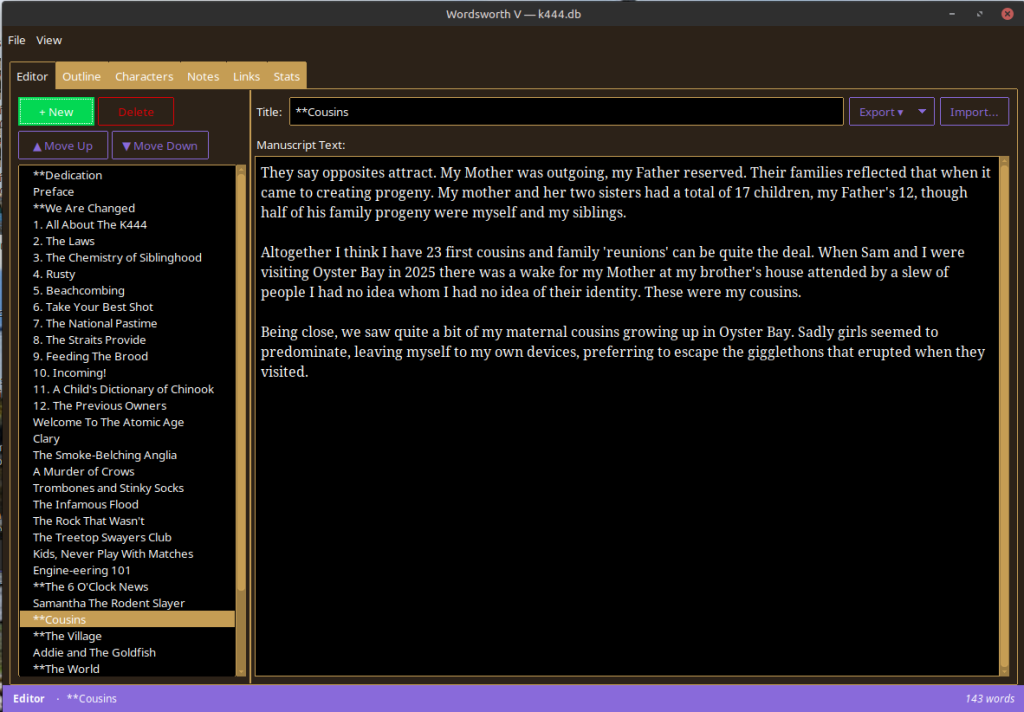
Presto – Wordsworth, a more ‘full-featured’ manuscript editor I am presently putting through its’ paces. Some of the features include:
- Sqlite3 on the backend (portable – just need to copy the executable and the db to create a new instance)
- Import from single or multiple text or html files
- Export to text, markdown, pdf and epub (Sigil ready) formats.
- Cross platform – Windows 11 and Linux Mint tested.
- Tabbed interface – Editor, Outliner, Character, Notes, Links (for saving web research URL’s) and Stats (daily and aggregate word counts).
- Add and delete ‘chapters’ directly
- Organize your chapters with the up and down buttons in the treeview at left.
- Auto-save or Ctrl-S to save at any time, with ‘unsaved’ / ‘saved’ status in the status bar.
- Supports the usual Ctrl-C, Ctrl-V, Ctrl-X commands in Windows and Linux.
- Small executable ~ 17Mb total
- The New ‘pac5’ theme for a slightly less dark workspace (love the purple status bar!).
- Floating Table of Contents so you don’t have to flip back and forth to the editor when working on outlines, characters and notes.
Still to add:
- Right context menu
- Support for images
- Auto-generated Table of Contents (for Text and PDF exports, Epub already includes the TOC).
It’s fun and hoping to have an executable available soon for folks who want to play…
Cheers,
Mark
One thought on “Wordsworth – First Looks…”